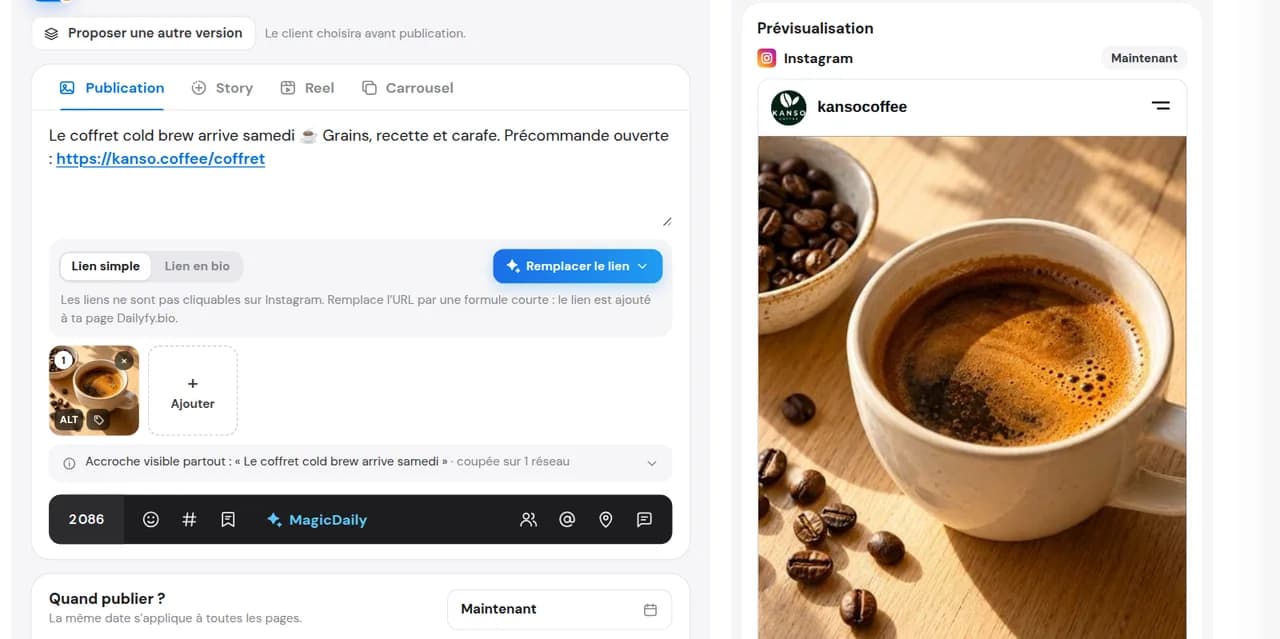
Paste your link into the caption
Your article, product or ticketing URL, directly in your Instagram or TikTok post.

Links in Instagram and TikTok captions prepared with Dailyfy are not clickable. AutoLink suggests replacing your URL with “link in bio”. Once you accept, the link joins your Dailyfy.bio page when the post is published.
14 days free, no credit card required
You publish a new product, article or offer, but your bio still points to the old one. With AutoLink, paste the URL into your caption as usual. Dailyfy handles the rest: clear wording for your audience and the right link at the top of your page at the right time.
Your article, product or ticketing URL, directly in your Instagram or TikTok post.
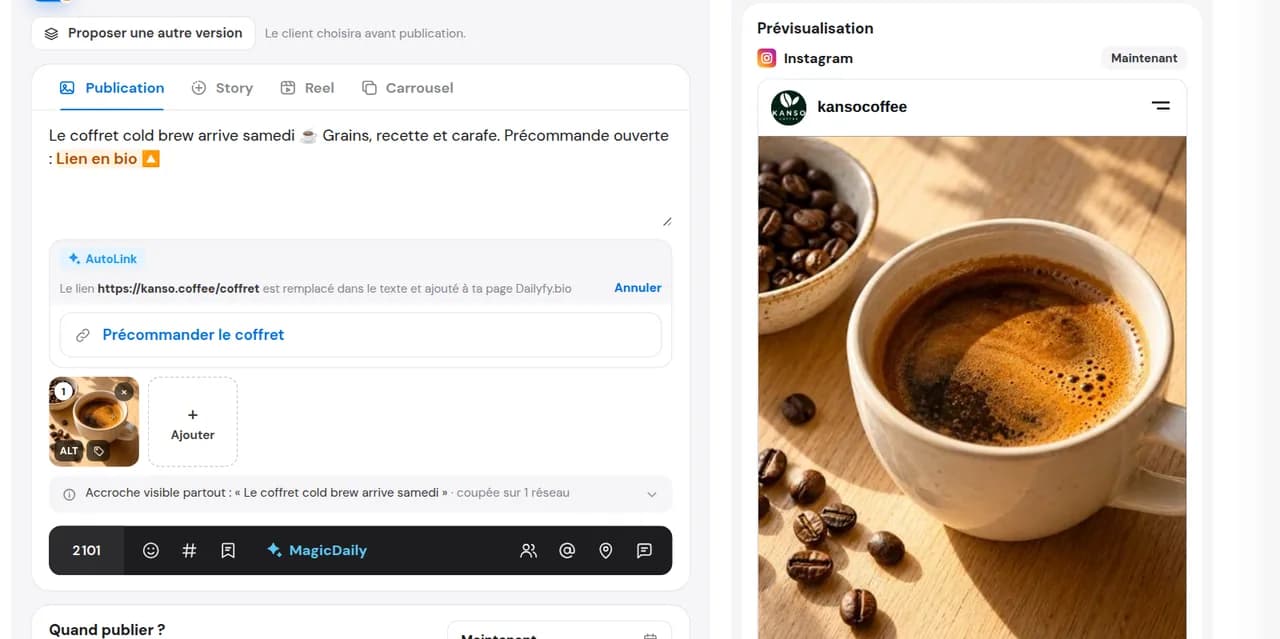
Dailyfy suggests replacing the URL with “Link in bio” and prepares to add it to your page. You can then edit this text.
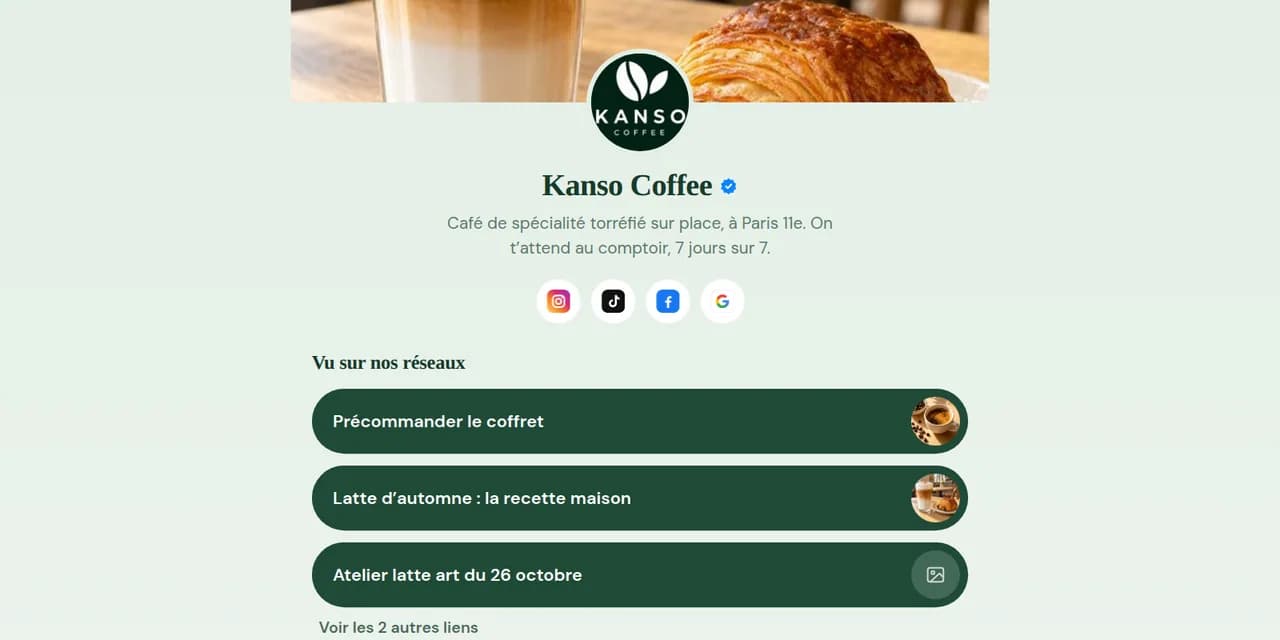
When the post goes live, the link appears at the top of your Dailyfy.bio page. Not before, and never forgotten.
For an Instagram post or Reel prepared with Dailyfy, a caption URL does not become a clickable link. Direct your audience through your bio or a Story link sticker. Ads may also offer a clickable destination. On TikTok, AutoLink addresses the same need for captions published through Dailyfy.
That is why people say “link in bio”: invite your audience to click your profile link. The problem is remembering to change it for every post, at the right moment. A link-in-bio page like Dailyfy.bio brings several links together, and AutoLink updates it for you with each post.
On LinkedIn, Facebook or X, you can also prepare your link in the first comment. On Instagram, keep the clickable destination on your Dailyfy.bio page.
Each new link goes to the top of your page when the post is published. Your audience always finds the right one.
No more long, unusable URLs in your caption: “Link in bio” makes the next step clear.
Dailyfy.bio analytics show clicks per link and where visitors come from: Instagram, TikTok or direct access.
Present your gift set in a Reel: the product link is at the top of your bio as soon as the Reel goes live.
Announce your new article or guide: your audience finds it in one click from your profile.
Workshop, ticket sales or this week’s offer: the link goes live exactly when you announce it.
Present your gift set in a Reel: the product link is at the top of your bio as soon as the Reel goes live.
Announce your new article or guide: your audience finds it in one click from your profile.
Workshop, ticket sales or this week’s offer: the link goes live exactly when you announce it.
In a post or Reel caption prepared with Dailyfy, the link is displayed but cannot be opened. Put it in your bio or a Story with the link sticker. AutoLink automates the bio option.
It detects the link in your Instagram or TikTok caption and suggests replacing it with “Link in bio”. After you agree, replacement is automatic and the text remains editable. The link joins your Dailyfy.bio page only when the post is published.
On Instagram and TikTok for captions published through Dailyfy. On Facebook, LinkedIn or X, the link stays in the text because it is clickable there.
Yes, AutoLink adds links to your Dailyfy.bio page. The page is free, but AutoLink requires a paid plan: it is Dailyfy.bio’s only paid option. Check pricing to choose a plan.
Yes, the caption remains editable before scheduling: rephrase the call to action however you like.
Yes. The analytics on your Dailyfy.bio page show views, clicks per link, click-through rate and visitor sources.
No. It appears on your Dailyfy.bio page when the post is published, so nothing is revealed before the announcement.
Paste your next link into a caption; AutoLink takes care of your bio.
Start for free14 days free, no credit card required