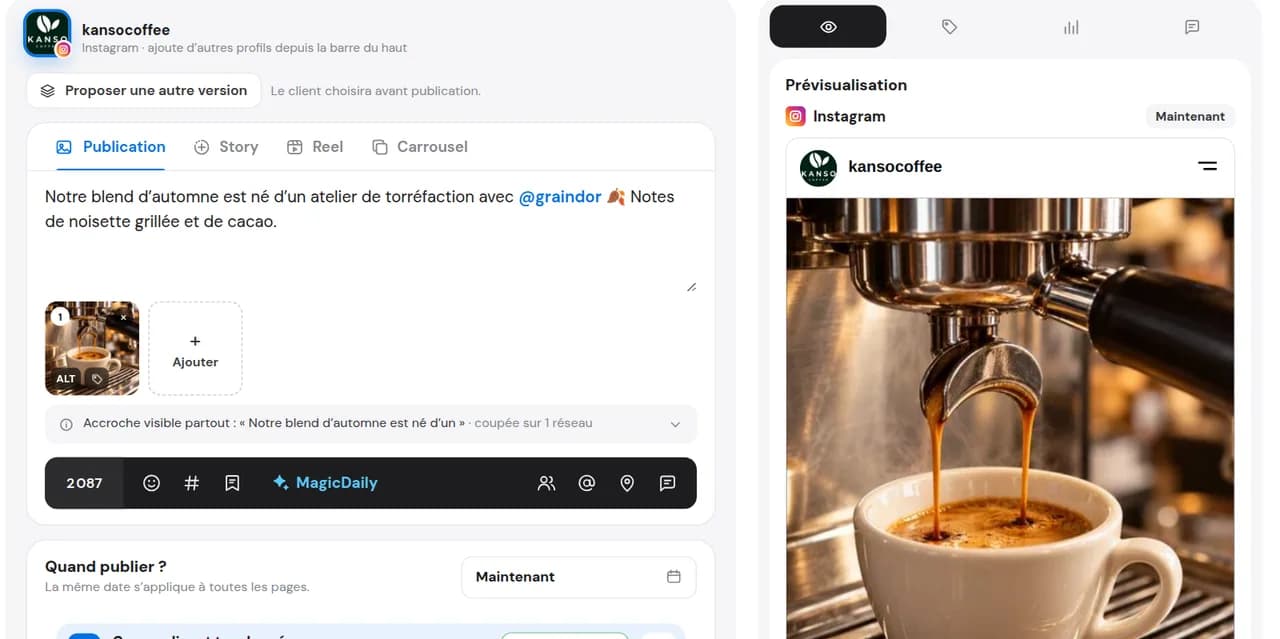
Prepare your content
Photo, carousel or Instagram Reel, Facebook Reel: add media, caption and a thumbnail for video.

Invite a creator, partner brand or sponsor to your Instagram post or Reel, or Facebook Reel. You prepare and schedule; Dailyfy publishes.
14 days free, no credit card required
A collaboration is one post shared across profiles after the invitation is accepted. In Dailyfy, add the collaborator in the editor, get approval if needed and schedule it with your campaign. The partner must still accept on the network.
Explore publishing calendar.
Photo, carousel or Instagram Reel, Facebook Reel: add media, caption and a thumbnail for video.
Find their Instagram account or Facebook page in the editor and add up to 5 collaborators on supported formats.
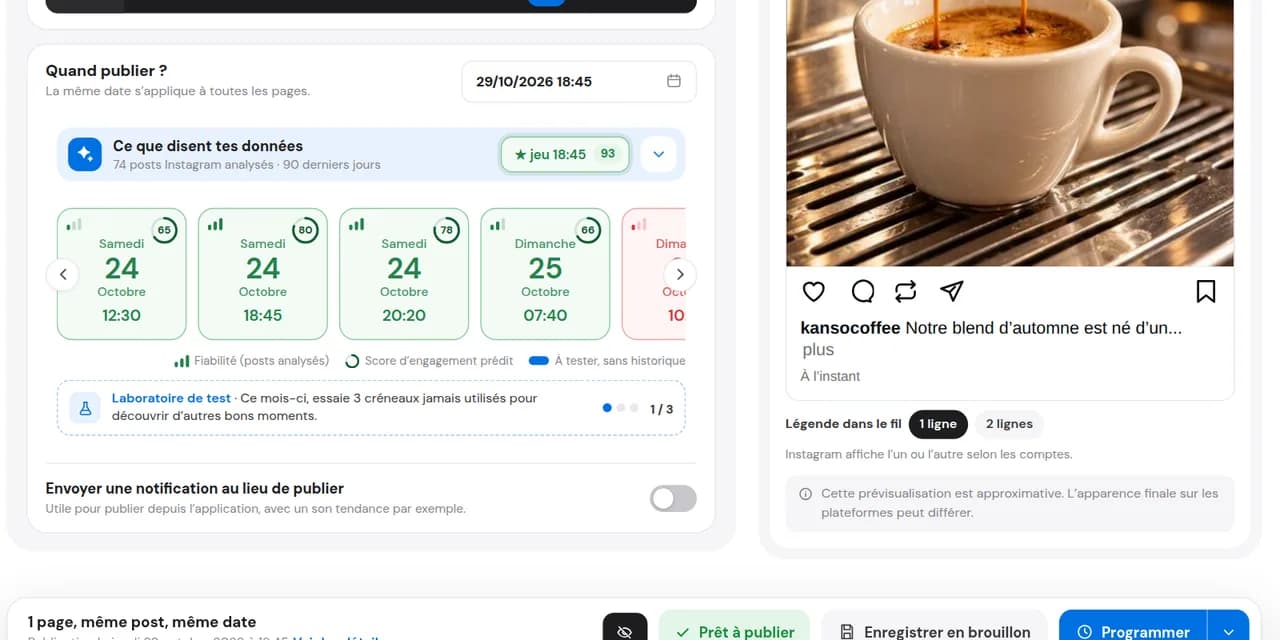
Choose a date. On publication, your partner receives the invitation. Track Instagram status in Dailyfy: pending, accepted or declined.
Once accepted, content appears on both profiles. Views, likes and comments are shared. Audiences may overlap: reach is not automatically doubled.
For sent or received Instagram collaborations, see who accepted or has not replied and respond without leaving Dailyfy. Facebook sends the invitation but does not return the reply.
Have the team or client review media, caption and chosen partner before scheduling.
Explore team approvalCollaboration does not end at publishing. Check acceptance, follow up unanswered invitations and handle incoming ones. In Dailyfy, everything runs through Feed view and notifications.
On Instagram, each collaborator’s status—planned, pending, accepted, declined—appears on the post and in history. Facebook sends the invitation but does not return the reply.
When an account invites yours on Instagram, the post appears in Feed view as “Collab invitation” with a notification. Accept or decline in Dailyfy; if accepted, it appears on your profile too.
Ask your client before accepting. If approval is mandatory in your DailySpace, acceptance waits for agreement. An administrator may override it, recorded in history.
Filter Feed view by collaboration status—received to process, pending, accepted or declined—to see outstanding tasks at a glance.
An Instagram collaboration is a post or Reel published by one account with others invited as co-authors. After acceptance, it appears on every participating profile with author names. Views, likes and comments are shared.
While preparing the post, open “Tag people”, then “Invite collaborator” and choose the account. The partner receives an invitation. Labels may vary by app version.
Add the collaborator in the editor, get approval if needed and schedule. Dailyfy publishes on time, sends the invitation automatically and tracks your partner’s Instagram reply.
When invited, Instagram sends a notification to accept in the app. With Dailyfy, it also appears in your schedule: accept or decline in one click after asking your client if needed.
Need to mention the partner in your caption too? Prepare their universal mention. A mention alone does not make them a co-author.
Publish the Reel filmed with a creator on both accounts and reach their community once the invitation is accepted.
A club invites its sponsor, a restaurant its producer, a shop its stocked brand: one post, two showcases after acceptance.
The same Reel goes to Instagram with the creator and Facebook with the distributor’s page: disable “Same post everywhere” and choose each network’s collaborator.
Publish the Reel filmed with a creator on both accounts and reach their community once the invitation is accepted.
A club invites its sponsor, a restaurant its producer, a shop its stocked brand: one post, two showcases after acceptance.
The same Reel goes to Instagram with the creator and Facebook with the distributor’s page: disable “Same post everywhere” and choose each network’s collaborator.
A post or Reel shared by two or more accounts after invitations are accepted. It appears on each participating profile, with shared views, likes and comments.
Instagram posts (photo or carousel) and Reels. On Facebook, Reels between pages.
Yes. They receive the invitation on Instagram or Facebook when the post goes live. Until acceptance, content is visible only on your profile.
No. They accept directly in Instagram or Facebook.
Up to 5 per post from Dailyfy, on supported networks, accounts and formats.
Yes. The post follows your usual approval workflow, including the partner.
No. This collaboration feature covers Instagram posts and Reels and Facebook Reels, not Stories.
On Instagram, yes: each collaborator has a status—pending, accepted or declined—and replies trigger a notification. Facebook sends the invitation but does not return the reply.
Yes. Disable “Same post everywhere” to choose a collaborator per network.
Yes, for Instagram. Invitations appear in Feed view and notifications: accept or decline without opening the app. Once accepted, the post also appears on your profile.
Yes. Ask for feedback before accepting. If approval is required in your DailySpace, acceptance waits for their agreement.
Yes, but through Instagram: Dailyfy cannot remove you after acceptance.
No. It is part of paid plans. Try it free for 14 days without a payment card. It works in the web editor, not the mobile app.
Invite your next partner and schedule a collaboration in minutes.
Start for free14 days free, no credit card required