
All features
The right hashtags for every post, chosen by MagicDaily.
MagicDaily reads your post and suggests a hashtag set for each network using your results, industry and trends. Add them in one click, while your regular lists stay organised in groups.
14 days free, no credit card required
Fewer hashtags, better chosen, post after post.
Instagram now limits posts and Reels to 5 hashtags and recommends avoiding generic ones. On TikTok and LinkedIn too, a few precise hashtags beat a long list. But which ones? MagicDaily suggests a set suited to the post and network, explains why, and Dailyfy warns if you exceed the limit.
Your hashtags in 3 steps.
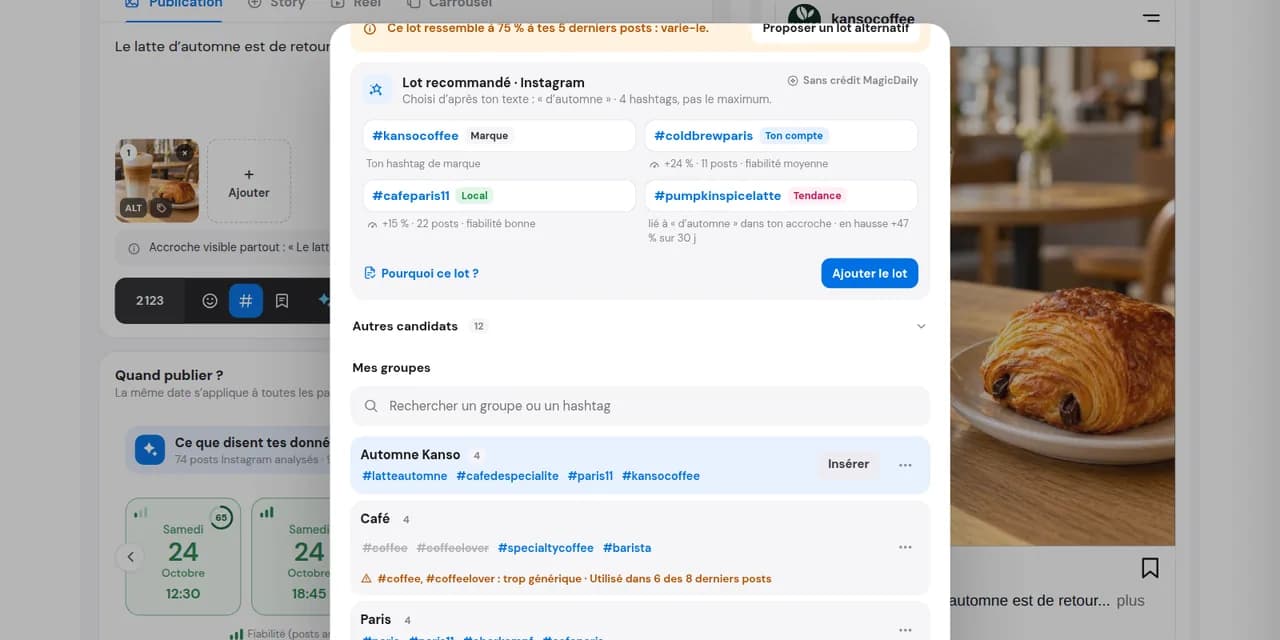
Review the suggested set
A set per network: brand, niche, local and sometimes a trend. “Why this set?” explains each choice.
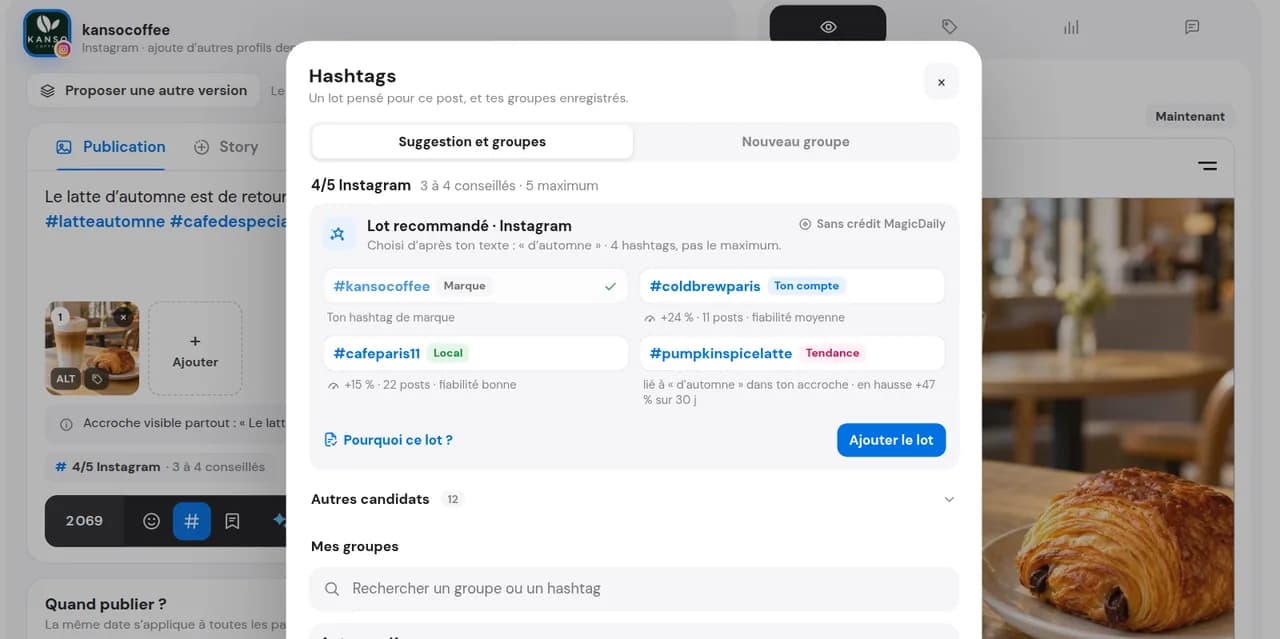
Add in one click
Add the whole set or chosen hashtags to the caption or first comment on supported networks and formats. Saved groups remain within reach.
Prepare the first commentThe right hashtags, without wasting time.
Choose based on your post
The set changes with the topic: cold brew and team posts need different hashtags.
The right number per network
MagicDaily never goes up to the maximum, and Dailyfy warns if a post exceeds Instagram or Threads limits.
Your regular lists, always ready
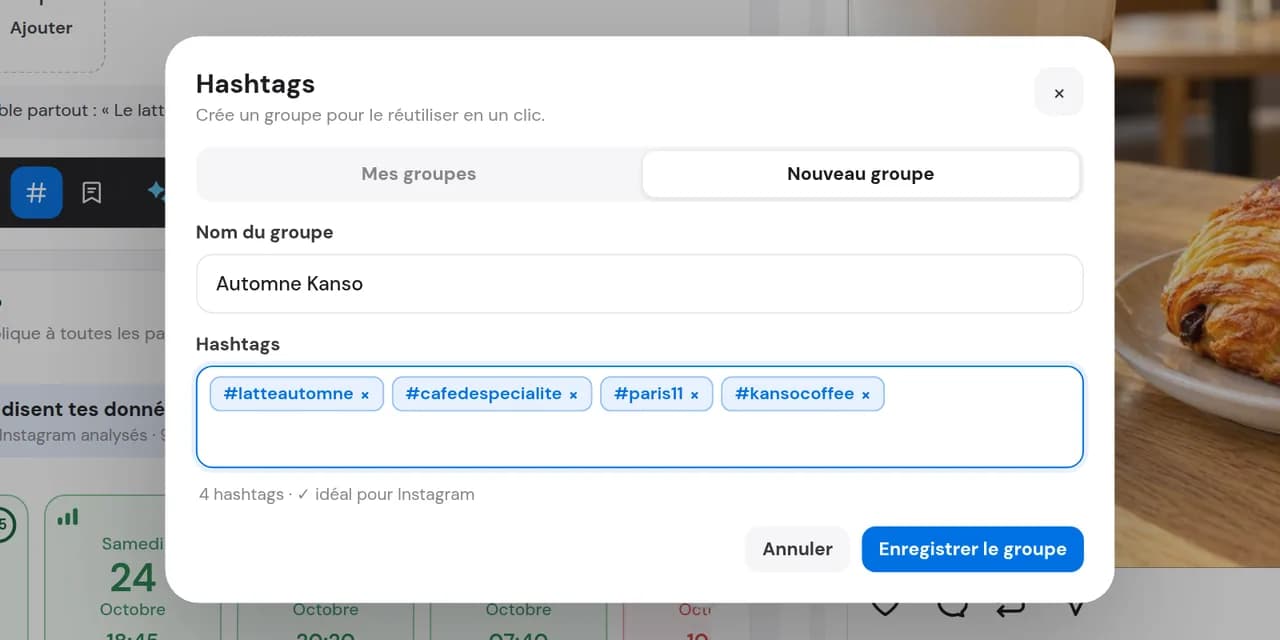
Brand or campaign hashtags: save them in groups so the team uses the same ones without typos.
How MagicDaily chooses your hashtags.
MagicDaily does not pick from a ready-made list. It combines several sources to build a set per post and network, and shows its reasoning.
A balanced mix
One brand hashtag, one or two niche tags, a local tag and sometimes a trend. Never the network maximum.
Real sources
Past posts, industry accounts, trends from the last 30 days and your location. From Start, MagicDaily also considers tracked Benchmark competitors.
Unsuitable hashtags excluded
Too generic (#instagood, #reels), a competitor’s brand tag, an unrelated trend or a hashtag already used in nearly every recent post. Every rejection is explained.
A little exploration
In about one post in five, MagicDaily adds a new hashtag to learn what works for you.
No MagicDaily credits
A hashtag’s effect is a trend observed in your posts, not a guarantee.
From Start, track competitors in Benchmark to refine hashtags.
How many hashtags on each network?
Hashtags mainly identify your post’s topic. Some networks impose limits; others have best practices. These are the guidelines MagicDaily uses.
How many hashtags on Instagram?
5 maximum: Instagram limits posts and Reels to 5 hashtags and advises against generic tags like #reels or #explore. 3 or 4 precise tags suffice.
Which hashtags on TikTok?
3 to 5 hashtags: one or two broad topic tags, the rest more specific to your niche. Put them in the video caption.
Should I use hashtags on LinkedIn?
Yes, but only a few: 2 or 3 at the end suffice. Choose industry tags (#Recruitment, #SpecialtyCoffee) over vague words.
What about other networks?
Facebook: 0–2 hashtags. Threads: one topic per post. X: 1–2. Bluesky: 0–2. Pinterest: 2–4. YouTube: 2–3. Google does not use hashtags.
| Network | Recommended | Limit |
|---|---|---|
| 3 to 4 | 5 | |
| TikTok | 3 to 5 | – |
| 2 to 3 | – | |
| 0 to 2 | – | |
| Threads | 1 topic | 1 topic |
| X | 1 to 2 | – |
| Bluesky | 0 to 2 | – |
| 2 to 4 | – | |
| YouTube | 2 to 3 | 60 |
Guidelines change with networks. MagicDaily tracks them, and Dailyfy warns before your post goes out with one hashtag too many.
Use MagicDaily suggestions as a useful base, then adapt them to each post. In Analytics, track each published hashtag’s performance, not saved groups.
Built for your real publishing needs.
One post, one set per network
The same post goes to Instagram, TikTok and LinkedIn: MagicDaily suggests a different set for each, in the right quantity.
A campaign
The official launch hashtag, saved in a group and written consistently by the team from first post to last.
A local brand
MagicDaily adds your neighbourhood hashtag when relevant, while city hashtags stay in a group.
One post, one set per network
The same post goes to Instagram, TikTok and LinkedIn: MagicDaily suggests a different set for each, in the right quantity.
A campaign
The official launch hashtag, saved in a group and written consistently by the team from first post to last.
A local brand
MagicDaily adds your neighbourhood hashtag when relevant, while city hashtags stay in a group.
Your questions about hashtags.
How does MagicDaily choose my hashtags?
It reads your post and builds a set per network: one brand hashtag, one or two niche tags, a local one and sometimes a trend. It uses past posts, industry, recent trends and your area, plus tracked Benchmark competitors from Start.
How many hashtags should I use on Instagram?
5 maximum: Instagram limits posts and Reels to 5 hashtags. 3 or 4 precise tags suffice; Dailyfy warns above 5. Moving them to the first comment must not be used to bypass the limit.
How many hashtags on TikTok and LinkedIn?
On TikTok, 3 to 5 hashtags. On LinkedIn, 2 or 3 suffice.
Why does MagicDaily never suggest the maximum?
Because a few precise hashtags beat a long list. It stays within each network’s recommended range.
Can I see why a hashtag is suggested?
Yes. “Why this set?” details the composition and sources. Under “Other candidates”, each rejected tag has a reason: too generic, a competitor’s tag, unrelated or overused.
Do hashtag suggestions use MagicDaily credits?
No, they use no credits.
What is a hashtag group?
A list saved under a name—brand, campaign or network—that you insert into posts in one click. Search by group name in the Composer. You can also save a MagicDaily set as a group.
Are groups shared with my team?
Yes. They are saved in the DailySpace and available to authorised members. Each DailySpace has its own groups.
Can I put hashtags in the first comment?
Yes, on supported networks and formats. Useful on LinkedIn or X to keep the opening readable. On Instagram, it must not bypass the 5-hashtag limit.
Does it work on all networks?
Yes, in the web editor: MagicDaily adapts the set to each network. It suggests none on Google, where hashtags are not used. The feature is unavailable in the mobile app.
How does it differ from Caption Manager?
Hashtags have their own tool. Caption Manager stores recurring text: signatures, practical information and calls to action.
Is this feature included in the free plan?
No. It is part of paid plans. Try it free for 14 days without a payment card. Using tracked Benchmark competitors is available from Start.
Your next hashtags, chosen in one click.
Write your post; MagicDaily handles hashtags.
Start for free14 days free, no credit card required